
If you want to track home energy use without hiring an electrician, these seven smart power meters give you a practical starting point. You’ll see which plugs, clamps, and displays fit your setup, along with where each one shines and where it falls short. The right choice can save you money and reveal hidden power drains, but a few of them may surprise you.
| Kill A Watt Connect Electricity Usage Monitor |  | Best Premium Monitor | Monitoring Type: Plug-in meter | Energy Tracking: Yes | Remote Control: No | CHECK ON AMAZON | Read Our Analysis |
| Kasa Matter Smart Plug with Energy Monitoring KP125MP4 15A/1800W Max |  | Best Smart Plug | Monitoring Type: Smart plug | Energy Tracking: Yes | Remote Control: App / voice | CHECK ON AMAZON | Read Our Analysis |
| Tapo Smart Plug Wi-Fi Energy Monitoring P115(4-Pack) 15A |  | Best Automation Pick | Monitoring Type: Smart plug | Energy Tracking: Yes | Remote Control: App / voice | CHECK ON AMAZON | Read Our Analysis |
| Govee Smart Plug with Energy Monitoring WiFi Bluetooth Outlet 4 Pack |  | Best App Control | Monitoring Type: Smart plug | Energy Tracking: Yes | Remote Control: App / voice | CHECK ON AMAZON | Read Our Analysis |
| SONOFF POWCT Smart Power Meter with Energy Monitoring |  | Best Panel Meter | Monitoring Type: Panel meter | Energy Tracking: Yes | Remote Control: App / voice | CHECK ON AMAZON | Read Our Analysis |
| eMylo 2-Channel WiFi Smart Power Meter (80A+80A) | Best Dual-Channel Option | Monitoring Type: Clamp meter | Energy Tracking: Yes | Remote Control: App / voice | CHECK ON AMAZON | Read Our Analysis | |
| Watt Meter Power Meter Plug Home Electricity Usage Monitor 7 Modes Display | 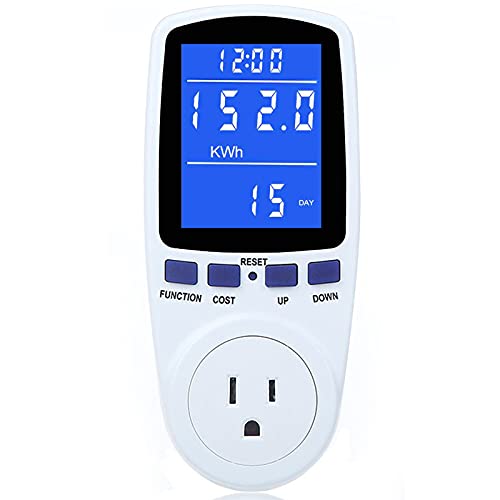 | Best Display Readability | Monitoring Type: Plug-in meter | Energy Tracking: Yes | Remote Control: No | CHECK ON AMAZON | Read Our Analysis |
Product availability last checked: October 2026
Which Power Meter Fits What You Want to Measure?
- One appliance at a time, no app needed: Kill A Watt or MECHEER plug-in meters.
- Track and automate several plug-in devices: Kasa KP125MP4 (Matter, keeps working on your local network), Tapo P115 4-pack or Govee.
- Hardwired or 240 V loads like a dryer, AC or water heater: clamp meters that install in the panel: SONOFF POWCT (100 A) or eMylo 2-channel (80 A).
What Does That Appliance Cost to Run?
Enter the appliance wattage (on its label) and how long it runs each day. The rate is a placeholder; use the one on your bill.
Monthly use: –
| Meter | Type | Can it measure this? | |
|---|---|---|---|
| Kill A Watt | Plug-in | – | View on Amazon |
| Kasa KP125MP4 | Plug-in, 1,800 W max | – | View on Amazon |
| Tapo P115 | Plug-in, 15 A | – | View on Amazon |
| Govee | Plug-in | – | View on Amazon |
| MECHEER | Plug-in | – | View on Amazon |
| SONOFF POWCT | Panel clamp, 100 A | – | View on Amazon |
| eMylo | Panel clamp, 80 A x 2 | – | View on Amazon |
Standard US outlets are 15 A, about 1,800 W, and plug-in meters share that limit. Anything bigger, or anything hardwired or on 240 V, needs a clamp meter installed in the panel.
More Details on Our Top Picks
Kill A Watt Connect Electricity Usage Monitor
If you want a best premium monitor for home energy checks, the Kill A Watt Connect fits nicely. You can measure volts, current, watts, frequency, power factor, and VA, so you get a broad view of how each appliance behaves. It also tracks cost by hour, day, week, month, and year, helping you spot pricey habits fast. The two-piece design and 35-inch cord let you keep the display visible while the plug stays out of sight. You can save minimum and maximum readings, which makes it easier to notice spikes, swings, and overall usage patterns at home and in the kitchen.
- Monitoring Type:Plug-in meter
- Energy Tracking:Yes
- Remote Control:No
- Voice Support:No
- Data Logging:Min/max memory
- Display:Remote LCD
- Additional Feature:Two-piece housing
- Additional Feature:35-inch cord
- Additional Feature:Cost tracking by period
Not ideal if you need to measure a 240 V or hardwired appliance. It only plugs into standard outlets.
Kasa Matter Smart Plug with Energy Monitoring KP125MP4 15A/1800W Max
Kasa’s Matter-ready energy monitor is a smart plug for DIYers who want simple, cross-platform control. You can use it with Apple Home, Alexa, Google Home, or SmartThings, and you’ll still get local LAN control between Matter devices even if your internet drops. It tracks energy use over time, so you can spot waste and adjust habits. The compact 15A/1800W design won’t block nearby outlets, and the UL-certified flame-retardant build adds peace of mind. You can also control it remotely in the Kasa app or hands-free with voice commands.
- Monitoring Type:Smart plug
- Energy Tracking:Yes
- Remote Control:App / voice
- Voice Support:Siri / Alexa / Google / SmartThings
- Data Logging:Usage history
- Display:App display
- Additional Feature:Matter compatibility
- Additional Feature:LAN control support
- Additional Feature:Flame retardant construction
Not ideal if your device draws more than 1,800 W. That is its maximum.
Tapo Smart Plug Wi-Fi Energy Monitoring P115(4-Pack) 15A
Tapo’s P115 4-pack is your go-to automation pick when you want energy tracking and hands-free control. You can see clear energy stats and intuitive charts in the Tapo app, so you’ll quickly spot power-hungry devices. It also shows cost estimates with single or periodic readings, helping you connect usage to your bill. Set schedules to run appliances off-peak and cut expenses. If a device draws too much power, the plug shuts it off to help prevent overloads. You can also stop overcharging with smart charging. Use Alexa, Google Assistant, or remote app control anywhere.
- Monitoring Type:Smart plug
- Energy Tracking:Yes
- Remote Control:App / voice
- Voice Support:Alexa / Google
- Data Logging:Cost charts
- Display:App display
- Additional Feature:Off-peak scheduling
- Additional Feature:Overload auto shutoff
- Additional Feature:Smart charging cutoff
Not ideal if you only need one plug. This listing is a 4-pack.
Govee Smart Plug with Energy Monitoring WiFi Bluetooth Outlet 4 Pack
Govee’s four-pack shines for hands-on homeowners who want app-based energy tracking and control. You can monitor real-time power, current, and voltage in the Govee Home App, then review daily, weekly, monthly, or yearly usage to spot waste fast. WiFi and Bluetooth let you control devices remotely on 2.4 GHz networks, and Alexa or Google Assistant adds easy voice commands. Set timers, build schedules, group devices, and share access with others. ETL and FCC certification, fire-resistant materials, and 15A, 120V support make it a solid pick for coffee makers and other heavy loads.
- Monitoring Type:Smart plug
- Energy Tracking:Yes
- Remote Control:App / voice
- Voice Support:Alexa / Google
- Data Logging:Daily-to-yearly history
- Display:App display
- Additional Feature:WiFi and Bluetooth
- Additional Feature:Group control sharing
- Additional Feature:Fire-resistant materials
Not ideal if you run Apple Home. The listing mentions Alexa and Google Assistant voice control.
SONOFF POWCT Smart Power Meter with Energy Monitoring
SONOFF POWCT fits you if you want a panel meter with safe, clamp-on current sensing. You clip the split-core CT around a line and measure up to 100 A without touching live wires, so you cut shock risk. It mounts in your electrical panel to track appliance or room usage, then stores data for up to 6 months, even through outages or removal. You can export logs for deeper analysis. Its 2A dry-contact relay lets you control a contactor, and WiFi gives you real-time monitoring plus Alexa, Google Home, and IFTTT support.
- Monitoring Type:Panel meter
- Energy Tracking:Yes
- Remote Control:App / voice
- Voice Support:Alexa / Google / IFTTT
- Data Logging:6-month storage
- Display:No display
- Additional Feature:100A CT clamp
- Additional Feature:No wire contact
- Additional Feature:Contactor control
Not ideal if you are not comfortable working inside an electrical panel. The clamp installs there.
eMylo 2-Channel WiFi Smart Power Meter (80A+80A)
If you need to monitor two circuits separately, eMylo’s dual-channel meter fits the job well. You clip its two 80A sensors onto live wires and track voltage, current, power factor, active power, frequency, and energy use in real time. It records hourly, daily, monthly, and yearly kWh, so you can spot waste fast. Through the Smart Life/Tuya app on 2.4GHz WiFi, you check data remotely and use Alexa or Google Assistant for voice control. Installation stays simple because you don’t cut cables; you just wire terminals and start monitoring safely.
- Monitoring Type:Clamp meter
- Energy Tracking:Yes
- Remote Control:App / voice
- Voice Support:Alexa / Google
- Data Logging:Usage records
- Display:App display
- Additional Feature:Dual 80A clamps
- Additional Feature:Two-channel monitoring
- Additional Feature:No cable modification
Not ideal if your router only broadcasts 5 GHz. It needs 2.4 GHz Wi-Fi.
MECHEER Watt Meter Power Meter Plug Home Electricity Usage Monitor 7 Modes Display
The Mecheer watt meter suits DIY users who want easy-to-read energy data at a glance. You can cycle through 7 modes to view watts, kWh, volts, amps, hertz, power factor, cost, min/max power, days, and runtime while your appliance runs. Its 2.36 x 1.85 inch backlit LCD stays readable from wide angles, so you don’t need to lean in. You can set the backlight timer, and overload protection warns you at 3680W. It also keeps your data after unplugging, so you won’t lose tracking.
- Monitoring Type:Plug-in meter
- Energy Tracking:Yes
- Remote Control:No
- Voice Support:No
- Data Logging:Memory backup
- Display:Backlit LCD
- Additional Feature:7 display modes
- Additional Feature:Adjustable backlight timer
- Additional Feature:Overload protection lock
Not ideal if you want readings on your phone. It shows them on its own LCD screen.
What Else You Will Need

Checks that the outlet is wired correctly before you trust its readings.
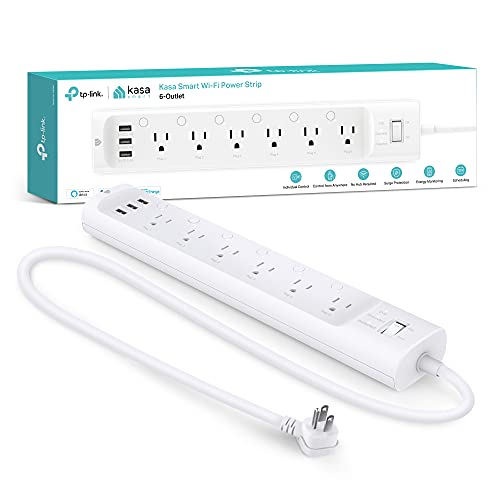
Monitors six outlets at once, handy for a desk or entertainment center.

A must-have safety check if you install a clamp meter in the panel.
Factors to Consider When Choosing Smart Power Meters for DIY Home Energy Monitoring
When you choose a smart power meter for DIY home energy monitoring, start by checking measurement accuracy so you can trust the numbers. You’ll also want real-time tracking, safety features, smart home compatibility, and enough data storage to fit your setup. These factors help you pick a meter that’s useful, secure, and easy to manage.
Measurement Accuracy
Accurate measurements are the backbone of any DIY home energy monitoring setup, because you need trustworthy voltage, current, power, and energy data to make sense of your usage. When you compare smart power meters, check how precisely they read watts, volts, amps, and kilowatt-hours, since small errors can distort your analysis. Sensor quality matters too: a well-designed split-core clamp or in-line sensor will capture current more reliably and improve overall power calculations. Look for models that store minimum and maximum readings, so you can spot spikes and dips that affect efficiency. You should also value overload protection and clear error alerts, because they help prevent bad readings when the circuit is stressed. That way, you get cleaner data and better decisions.
Real-Time Tracking
Real-time tracking lets you see voltage, current, power, and frequency as they change, so you can tell at a glance how much electricity you’re using right now. You’ll spot spikes, dips, and unusual patterns fast, which helps you cut waste before it adds up. Look for a meter that refreshes continuously and shows clear charts, live readings, or simple stats you can understand quickly. When the data syncs with an app or smart home platform, you can check usage from anywhere and adjust devices on the fly. Handy alerts can also notify you about abnormal draws or heavy loads, so you stay informed without staring at the screen. With strong real-time feedback, you make smarter choices throughout the day.
Safety Features
Safety features should be a top priority when you choose a smart power meter for DIY home energy monitoring. You should look for overload protection that warns you when consumption climbs too high and disables controls before a hazard starts. Choose meters built with flame-retardant, fire-resistant materials to lower fire risk if something goes wrong. Clamp-on current sensors are a smart pick because they don’t require direct contact with live wires, which cuts your shock risk during installation and use. Check for ETL, FCC, and UL certifications, since they show the product meets recognized safety standards. Built-in automatic shutoff can also protect your system by stopping excessive loads or overcharging batteries, helping you avoid damage and keep your setup safer overall.
Smart Home Compatibility
Smart home compatibility matters because it determines how easily you can fold a power meter into your existing setup and control everything from one place. You should check whether the meter works with your preferred ecosystem, so you can view energy data alongside lights, thermostats, and plugs. Matter-certified support is especially useful because it lets devices from different brands communicate locally, even when your internet is down. Voice assistant integration with Alexa, Google Assistant, or Siri also makes daily control easier when you want quick, hands-free commands. Look for native apps or platforms like Tuya and Smart Life if you want smoother automation, remote access, and better linking between devices. Strong local automation support helps you build energy-saving routines that respond instantly.
Data Storage
Data storage matters because it lets you track how your energy use changes over time, not just in the moment. You can review hourly, daily, weekly, monthly, and yearly patterns to spot where electricity goes. Good meters also keep minimum, maximum, and cumulative readings even if power drops or the device disconnects, so you don’t lose key data. If you want deeper analysis, look for models that save data automatically and store it for months. Exportable files or cloud sync make it easier to compare results, build records, and use other tools. With historical data in hand, you can detect spikes, identify waste, and make smarter choices that reduce energy costs.
Installation Ease
Once you’ve got good historical data, the next question is how easy the meter is to get up and running in your home. You should favor smart power meters that need little or no rewiring, because less disruption means a safer DIY install. Clamp-sensor models are especially convenient: you can clip them onto live wires without making direct electrical contact. If you want the simplest path, choose plug-and-play or plug-in units that skip hardwiring and panel access altogether. Clear, step-by-step instructions also matter, since they help you set everything up confidently and quickly. Check that the meter matches standard household voltage and current ratings, so you won’t need extra components or adjustments. A user-friendly interface can make setup smoother too.
Frequently Asked Questions
How Accurate Are Smart Power Meters Compared With Utility Bills?
You’ll usually see smart power meters track utility bills closely, but they’re not exact. You may notice small differences from rounding, calibration, timing, and estimated billing, so check your meter’s setup and your utility’s measurement methods.
Can These Meters Track Solar Panel Energy Production Too?
Yes, you can track solar panel production with many smart power meters if you install them on the generation side. You’ll see output, export, and net usage, but some systems need compatible CT clamps or inverters.
Do Smart Power Meters Work Without a Smartphone App?
Yes, you can use some smart power meters without a smartphone app, but you’ll usually lose setup, live monitoring, and history. You can still read basic data locally on the meter or via a display.
How Hard Is It to Install a Whole-Home Smart Power Meter?
It’s moderately hard: you’ll usually need to open your electrical panel, shut off power, and clamp sensors carefully. If you’re comfortable with basic wiring and safety, you can do it; otherwise, hire an electrician.
Are My Energy Monitoring Data and Wi-Fi Connection Secure?
Yes, your data and Wi‑Fi can be secure if you choose reputable devices, update firmware, use strong passwords, and separate them on a guest network. You’ll greatly reduce risks, but no system is perfectly safe.